


AntiX Linux is a heavily cut-down version of Debian 13, with a choice of init systems and ultralightweight GUIs. This means it’s able to run usefully on older and lower-end PCs – and, of course, to run faster on modern ones.
AntiX 26 “Stephen Kapos” is the newly updated version of antiX, based on last year’s Debian 13 “Trixie” release. There are a lot of Debian-based meta-distributions to choose from, but antiX is more unlike its upstream than almost any other Debian-based distro.
The 2026 release offers a choice of two kernels: the old but still supported 5.10, or the slightly newer kernel 6.6. Unlike Debian itself, it still offers a 32-bit edition, which uses the older kernel version. We looked at the previous release, the Debian 12-based antiX 23, all the way back in September 2023, and we noted then that it had a confusing 16 different options available to download. In antiX 26, this has been simplified down to just four: the choice now is Full or Core, 32-bit or 64-bit, and that’s it.
Although BunsenLabs Carbon, which we looked at earlier this month, has a simpler, lighter-weight desktop, apart from that it’s still Trixie, systemd and all. The Debian 13 codename comes from a cartoon Triceratops, and those were neither slim nor light. Bunsenlabs’s use of Openbox means that it takes just over half a gigabyte of RAM, but antiX 26 needs less than half as much: about 200 MB.
As we said when we looked at Devuan 6 last November, “This is essentially the same OS as Debian 13, but with Agent P’s sprawling ‘system and service manager’ surgically removed.” Devuan no longer offers GNOME – that desktop is explicitly introducing stronger dependencies on systemd – but Devuan still offers KDE Plasma, for instance.
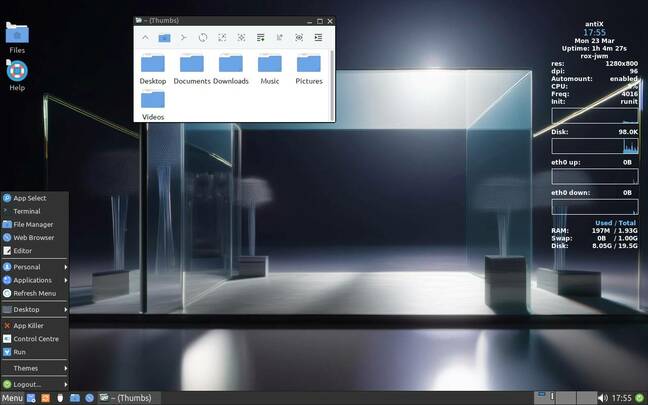
This is not the case in antiX. Some other distros remove systemd but add other packages to replace parts of systemd’s functionality instead, such as the Elogind seat manager. Not antiX – which means you can’t have GNOME, or KDE, or Flatpak, or Snap. However you install it, the boot menu offers a selection of both kernel versions, each with five different init systems. After you log in, there’s a helpful link to the antiX FAQ file left on the desktop. It explains:
Even after you boot up, there is plenty more choice. The login screen offers four window managers: IceWM, Fluxbox, JWM, and the tiling Herbstluftwm. For each of the three stacking window managers, there’s also a choice of file managers. From the login screen, you can pick zzzFM, which is a fork of SpaceFM, itself forked from LXDE’s PCmanFM – so it’s broadly Windows-like, and will be relatively familiar to most people. Or, alternatively, you can choose ROX Filer. This is part of the ROX Desktop, which is an old favorite of this vulture. It works like the file manager of RISC OS, the original native OS for Arm chips, which is older than either Linux or even Windows 3 – and therefore completely different.
Back in January, the release candidate announcement said:
That’s fair, because minimalist it ain’t. Between two kernel versions, five init systems, four window managers, and two file managers, by our calculations we think that means 130 different possible login configurations out of the box. That’s the price of unrestricted freedom. At least you can have hours of fun working out which one is fastest, or uses the least memory, or which you find easiest to adjust to your preferences.
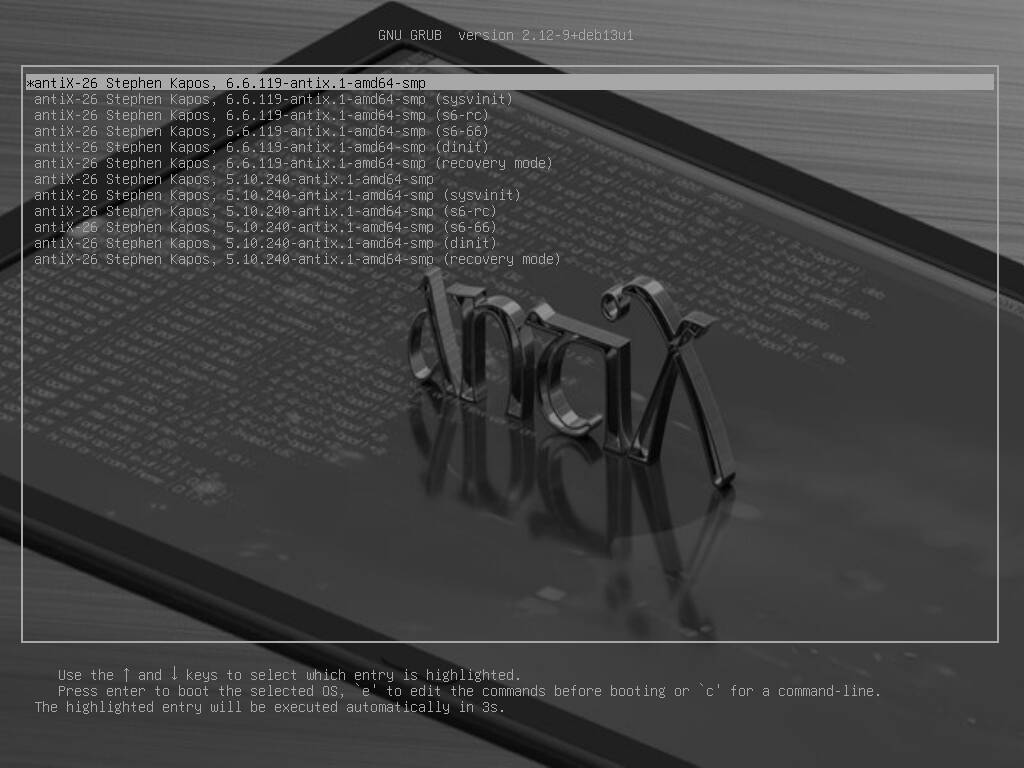
The antiX 26 boot menu offers two kernel versions and five different init systems – click to enlarge
Both IceWM and JWM are so Windows 95-like that we don’t see much to choose between them, and Fluxbox has been configured similarly, with a bottom panel. There was an opportunity to offer some more radically different desktop layouts here, or reduce duplication, but we’re sure there are some differences here that are really important to someone, somewhere.
AntiX Linux is one of the parent distros of MX Linux, which is much more friendly to non-techies. This includes using the same installation program. We left it almost entirely on its default settings, which meant a 1 GB swap file on the root partition. With that included, antiX 26 takes just over 8 GB of disk. Again, it’s not minimal, but the RAM requirements are about as low as any modern Linux gets.
There is nothing else quite like antiX. It’s extremely light on memory, CPU and GPU usage, offers an almost overwhelming amount of choice, but still contains pretty much all the tools you might need. ®
